Issues
If the media profile is marked as Top 1000 Media, you must have issues created for it.
We always create the Top 1000 Media issues for each country during the last month of the year because we receive the new mediakit with the editorial program for the next year at this point.
- The main function of an issue is to inform the media plan (advertising campaign) of the publishing deadline.
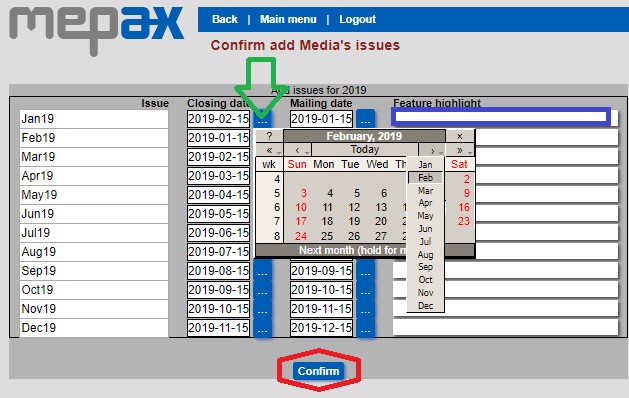
- To create the issues, go to your media profile and choose the first publishing deadline date, then click on Add, as shown below in orange.

- Now you can add specific deadline dates according to the editorial program in green.
- You can also indicate the main topic below in blue.
- Then click on confirm to save your changes.
At this step your issues are created but you can make some changes if needed:
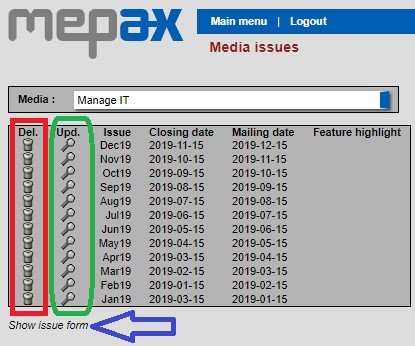
- As displayed below in red you can delete an issue.
- As shown below in green, if you click on the magnifying glass, you can view the issue and modify something.
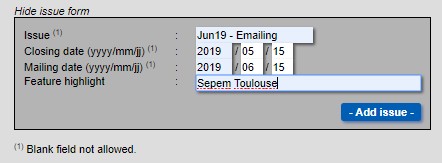
- As shown below in blue, if you click on show issue form, you can add more issues.
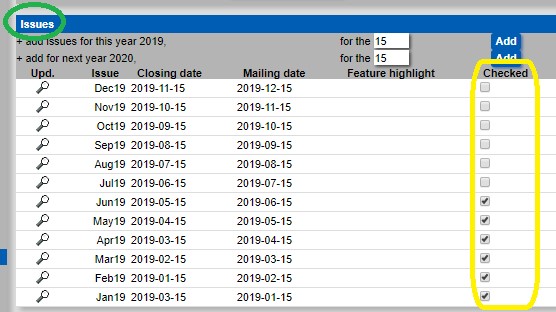
- Once you have reviewed the monthly issue to find published article and so on, check the box as shown below in yellow to indicate that your review is complete.
- By clicking on issues in green you can add a new issue which is very helpful if you want to put an actual date for a specific advertisement.